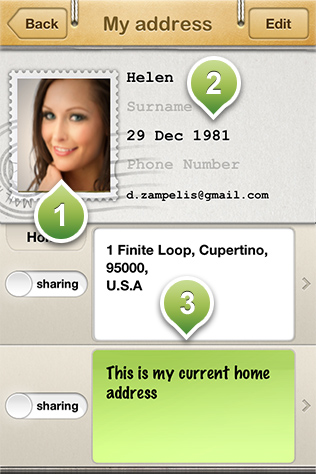
Your address edit screen. Here you can edit your personal details such as your name, phone number and age of birth. In this screen you can also add or edit addresses and notes to share then with your friends.
1) Profile photo: It allows you to share a picture of yours in your profile
2) personal details. Can be editable by pressing the edit button on the upper right corner of the screen
3) Address and notes: Here you can see the addresses and notes that you can share with your friends. You can share up to four addresses or notes at the same time. Activating the sharing of an address can be achieved by sliding the button on the left of each of them. When the button indicates "sharing" all your friends that are invited to share their addresses with you can see these addresses on their phone, under your profile in their friends list.