Your friends list contains all the friends of yours that have joined you to share their addresses with you. In this screen you can also accept, rejects or block a new friend's invitation. If you choose to block a person trig to be your friend, you can always unblock this person by sending him a friend invitation. Every time you send a friend invitation to someone, if that person is blocked by you, it gets automatically unblocked.
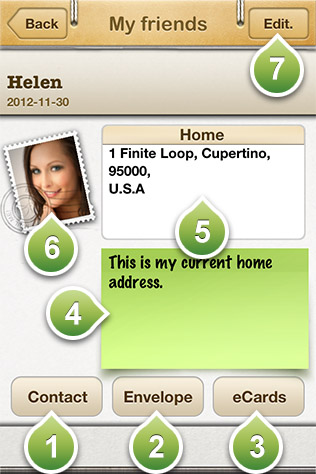
Taping one of your friends reveals the panel shown on the above photo. In there you have the following options:
Contact: it lets you send an email to the selected friend. If your friend has decided to include a phone number in her profile, then by pressing the contact button you will also present with the options to send an SMS message or call them on their phone.
Envelope: it allows you to easily print an envelope containing the address of the selected friend and your address. If your friend is sharing more than one addresses then by tapping their address on the envelope will allow you to select another address. On the sender place on the envelope is show your first address you are sharing.
eCards: Here you ac access all the virtual postcards this specific friend has sent to you.
A note shared by your friend.
An address shared by your friend. You can find your friend's address on map, if you tap and hold the address.
Your friend'sprofile photo.Tap it to see it in full screen.
Press the edit button if you want to delete one of your friends. It also provides you with a shortcut to invite new friends to share their addresses with you.