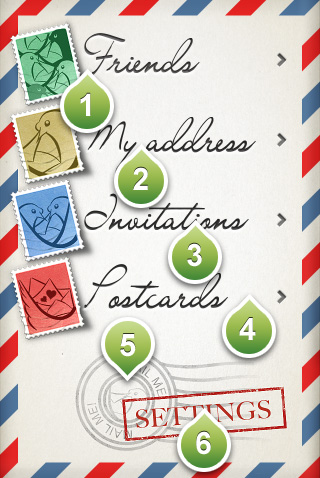
This is the main screen that allows you to access all the exciting features of the app!
From the main screen you can choose the following options:
1) Your friends list. Here you can see all your friends that you have send invitation. You can see their updated addresses or published notes, you can find the location on the map, you can print an envelope that will contain their address and you can contact them by sending them an email, sms or making a phone call to them.
2) Your addresses. Here you can change your address, add multiple address and change their status to "online" for sharing or "inactive" if you want them to be invisible on your friend's list. All the people contained in your friends list can access your updated addresses and notes. In this screen you can also edit your personal details, like your name, your phone number, your date of birth and your personal photo
3) The invitations screen. Here you can invite a friend to be added in your friend list and share your addresses.
4) The postcard editor. This is an advanced postcard editor that let you download themed postcard collections and write on them your messages or add your photos. You can print the postcards you created so you can send them to your real address of your friends, or you can be more modern and send them as e-cards on your friend's email, Twitter and Facebook account.
5) The online indicator. This stamp is visible when you are your phone detects an internet connection. When online, you can edit your addresses and details and refresh your friend's addresses anytime you like. If you are offline, you can still access the addresses of your friends, but these will be the ones saved in your phone from the last time you were online. Also when offline, the addresses and notes that were active for sharing, will still be visible to all your friends. You will need to connect to internet to change your addresses and personal details, or change the sharing status of an address or note though.
6 The settings button. Tap it to access options such as login/logout, access your MailMe! number get help on the app, e.t.c.