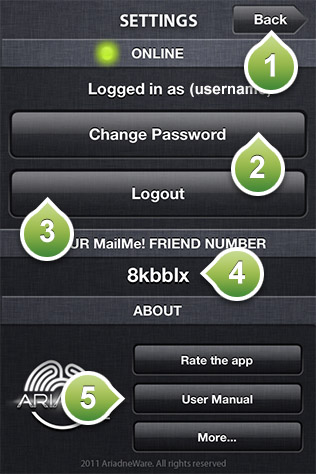
This is the settings screen for the MailMe! app. This screen indicates if you are online or offline. When you don't have access to internet, you are set automatically to offline mode. In this mode you can still access your friend's addresses but you are limited on creating or editing new addresses or deleting downloaded postcard packs. In this screen you have the following options:
1) Press to go back to main menu.
2) Press to change your password.
3) Press to logout.
4) Your MailMe! friend number. This number is a unique number that let's other people find you. Every MailMe! user has a unique MailMe! ID. It is advisable not to publish this ID. Share this ID ONLY with friends and people you trust to share your address with.
5) Tap to send us some love by rating the app, to access the user manual or have access in options like joining us on Facebook, following us on Twitter, technical support and other apps made by AriadneWare.